Understanding Projects
What Projects are
A Project is a persistent, configurable workspace within Claude. It has three components:
- System instructions — a custom prompt that shapes Claude's behaviour for this context: its persona, its constraints, its task focus, and its output style.
- Knowledge (optional) — documents and files you upload that Claude can reference in every conversation within the Project, without you having to paste them in each time.
- Members — the people who can access and use this Project.
When a member opens a Project and starts a conversation, Claude operates within the frame you have set. It follows the system instructions, has access to the knowledge files, and behaves consistently for every conversation in that space.
Projects persist across sessions. Unlike a one-off conversation, a Project retains its configuration indefinitely. Members can continue previous conversations, and the system instructions are always active.
The difference between a Project and a regular conversation
| Regular conversation | Project |
|---|---|
| Blank context each time | System instructions always active |
| No shared configuration | Shared by all Project members |
| No persistent knowledge | Knowledge files available to all |
| User-specific | Team or department resource |
| Disappears after retention period | Persists as long as Project is active |
In practice: if you want every member of your Legal team to have a consistent Claude experience when reviewing contracts — same behaviour, same knowledge of your standard contract terms, same output format — a Project delivers that. A regular conversation does not.
Use cases by function
The most common Project use cases in enterprise deployments, by function:
Legal:
- Contract review and redlining guidance (knowledge: standard terms, risk thresholds)
- NDA first-pass analysis
- Legal research summarisation
Human Resources:
- Job description drafting (knowledge: job architecture, competency framework)
- Employee FAQ answering (knowledge: HR policies, benefits documentation)
- Performance review commentary drafting
Finance:
- Financial commentary writing (knowledge: reporting templates, terminology guide)
- Board report summarisation
- Variance analysis narrative
Sales and Business Development:
- Proposal drafting (knowledge: product overview, pricing guidance, case studies)
- Client email drafting
- Competitor analysis
IT and Engineering:
- Code review and documentation
- Incident post-mortem drafting
- Architecture decision records
Marketing:
- Content drafting (knowledge: brand guidelines, tone of voice guide)
- Campaign brief writing
- Social media copy
Customer Support:
- Response drafting (knowledge: product FAQs, support playbooks)
- Escalation triage
Model selection
Within a Project, an admin or Project owner can select which Claude model to use. The available models depend on your Enterprise contract. Typically:
- Claude 3 Haiku (or equivalent fast model) — fast, lower cost, appropriate for high-volume tasks that do not require deep reasoning (e.g., customer support responses, simple summaries)
- Claude 3 Sonnet (or equivalent mid-tier) — balanced capability and speed, appropriate for most business writing and analysis tasks
- Claude 3 Opus (or equivalent frontier model) — highest capability, appropriate for complex reasoning, detailed analysis and tasks where quality is paramount
For most Projects, Sonnet (or equivalent) is the right default. Reserve Opus-class models for Projects where the task genuinely benefits from the additional capability.
Note: model naming changes as Anthropic releases new model families. Check your Admin Console for the current model options.
Projects as a governance tool
Beyond productivity, Projects serve a governance function:
Visibility: admins can see all Projects in the organisation. This gives you a map of every configured AI workflow.
Consistency: a Project ensures every user in a team interacts with Claude in a consistent, policy-compliant way, rather than each person crafting their own prompts with varying quality and safety.
Auditability: because system instructions are stored and visible, you can review what instructions are governing a particular workflow at any time.
Updateability: when circumstances change (a policy update, a new template, a legal change), you update one Project and it is immediately reflected for every member.
Scenario: before and after Projects
Before: The Marketing team at an e-commerce company uses Claude individually. Each of the eight marketing managers has developed their own prompting habits. Brand voice is inconsistent: some prompts produce formal copy, others casual. One manager has started asking Claude for competitor pricing — a potential compliance issue — because there is no clear guidance.
After: The IT admin creates a Marketing Project with: (a) a system prompt specifying the brand voice, tone guidelines, and prohibited uses (including "do not speculate about competitor pricing or product roadmaps"), and (b) the company's brand guidelines uploaded as a knowledge file. Now every marketing manager gets consistent, on-brand outputs. The compliance concern is addressed at the system level without needing to write a separate policy memo.
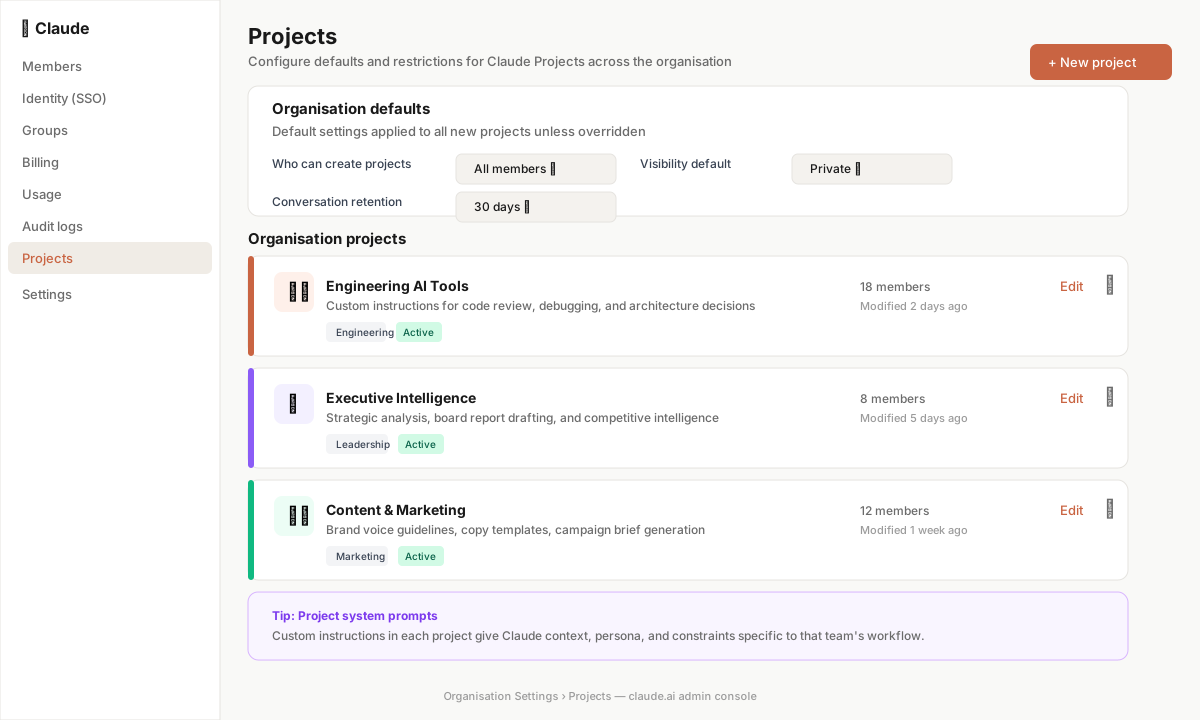
Key takeaway
Projects are the primary mechanism for deploying Claude in a structured, consistent, governable way across your organisation. Design your Project landscape before your first users arrive: decide what workflows need a Project, what knowledge each needs, and who gets access. A well-designed Project landscape is more valuable than any number of ad-hoc conversations.
📖 Official Documentation See this in practice in Anthropic’s live support docs: